Find misconfigured Azure resources with Resource Graph Explorer
If you want to check a setting across many Azure resources, opening each resource in the portal takes time.
For me, it was the following question to be answered: Which storage accounts still have an old minimum TLS version configured?
With Azure Resource Graph Explorer, you can answer this with one query across the subscriptions you have access to.
You can find it in the Azure portal by searching for Resource Graph Explorer. It uses KQL (Kusto Query Language), just like Log Analytics.
Why I use it
Resource Graph lets you query the Azure Resource Manager (ARM) properties of your resources. Resource Graph uses indexed data, so queries are usually fast.
I find it useful for answering questions like:
- Which resources are missing a required tag?
- Which storage accounts allow public blob access?
- What resources do we have in a specific subscription?
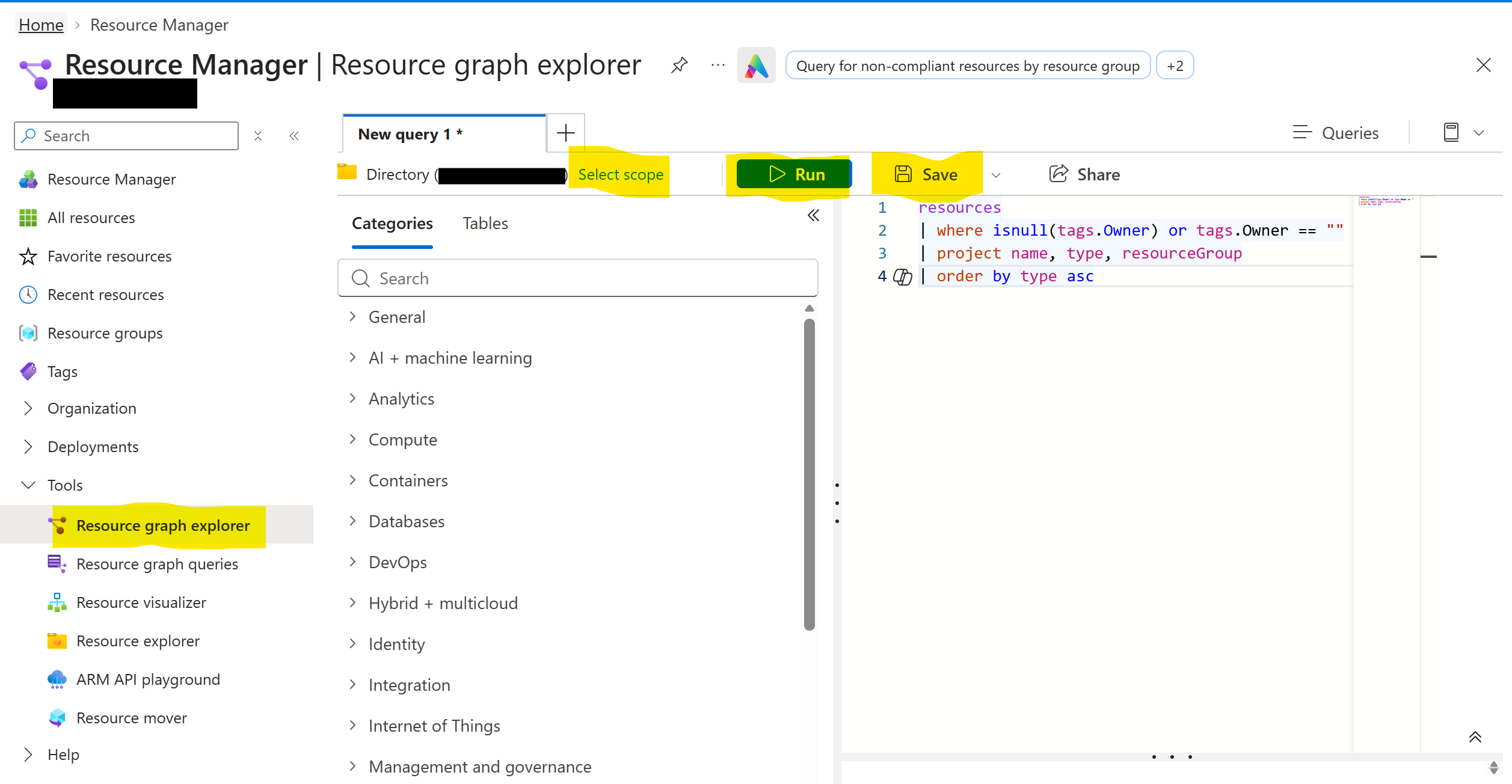
You find Resource Graph Explorer in Resource Manager, under Tools. Write the query in the editor on the right and click Run. On the left, Categories and Tables show which resource types and tables you can query.
By default, the query runs across every subscription you can read in the current directory. With Select scope, you can limit it to a management group or a subscription.
You can also save queries to reuse them later. Private queries are only visible to you. Shared queries are stored as Azure resources and can be accessed by others with the right permissions.
Check the minimum TLS version of storage accounts
This is one of the queries that made me start using Resource Graph:
resources
| where type == "microsoft.storage/storageaccounts"
| project name,
          resourceGroup,
          subscriptionId,
          tls = tostring(properties.minimumTlsVersion)
| order by tls asc
The query lists all storage accounts and their configured minimum TLS version, across every subscription you can read in the current directory.
If you see TLS1_0 or TLS1_1, the account still has an old setting. An empty value means the property was not explicitly configured.
Azure Blob Storage stopped supporting TLS 1.0 and 1.1 on February 3, 2026. This query checks the configured minimum TLS version.
Find storage accounts that allow public blob access
resources
| where type == "microsoft.storage/storageaccounts"
| where properties.allowBlobPublicAccess == true
| project name, resourceGroup, location
This shows storage accounts where anonymous blob access is allowed.
Find resources without an Owner tag
resources
| where isnull(tags.Owner) or tags.Owner == ""
| project name, type, resourceGroup
| order by type asc
This finds resources where the Owner tag is missing or empty. The query checks that specific spelling of the tag name.
I find this useful before adding an Azure Policy that requires the tag. You can first check how many resources would need to be updated.
A few things to know
There are a few things worth checking when working with Resource Graph:
- Property names: Use the property names from ARM JSON, not the labels you see in the portal. If your query doesn’t return what you expect, check the resource JSON or the schema browser in Resource Graph Explorer.
- Result limits: Resource Graph can return up to 1,000 rows per query response. If you expect more, use
| countto see the total number of matching resources. You can use pagination when you need all the rows.
Run the same query from Azure CLI
You don’t need to open the portal every time. You can also run Resource Graph queries with Azure CLI:
az graph query \
  -q "resources | where type == 'microsoft.storage/storageaccounts' | project name, tls = properties.minimumTlsVersion" \
  --output table
The command uses the Azure Resource Graph CLI extension, which Azure CLI can install automatically.
This is useful when you want to include the same checks in a script or pipeline.
I usually start by testing the query in Resource Graph Explorer and then use it in the CLI if I need to run it regularly.